


Loved by 250k+ users with4.8rating
Stop scrolling.
Start earning it.
Lockout locks your most distracting apps until you complete a challenge. Do the work. Unlock the app.
Free on iPhone. Requires iOS 18 or later.
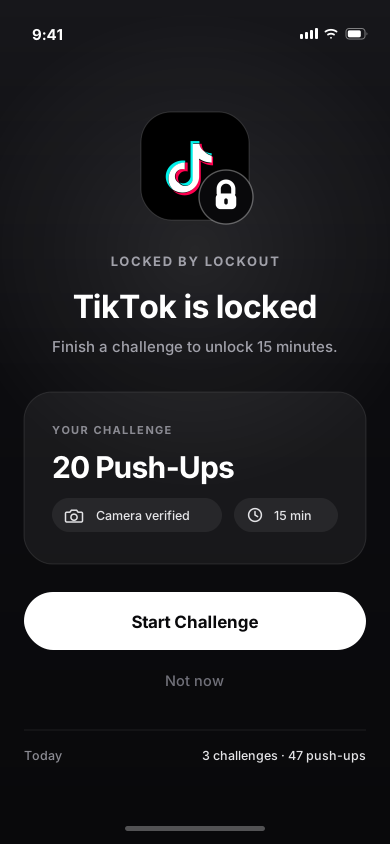
Stands guard over the apps you lose hours to


- + whatever else you add
Turn distractions into rewards.
Three steps. Then your phone stops being the easiest thing in the room to reach for.
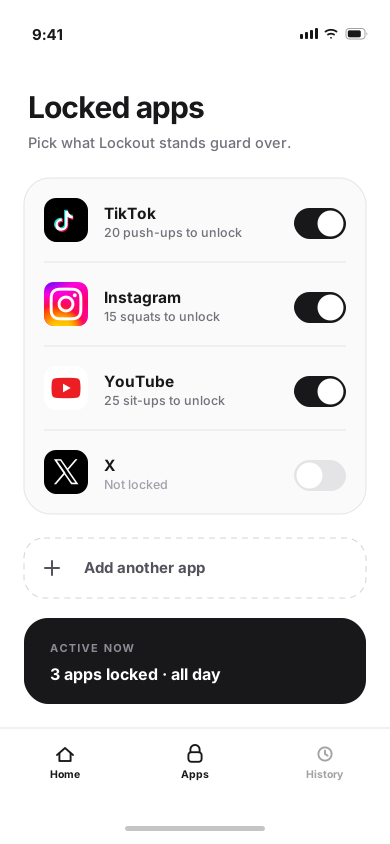
Pick your apps
Choose the apps that eat your day. Lockout stands guard over them and nothing else.
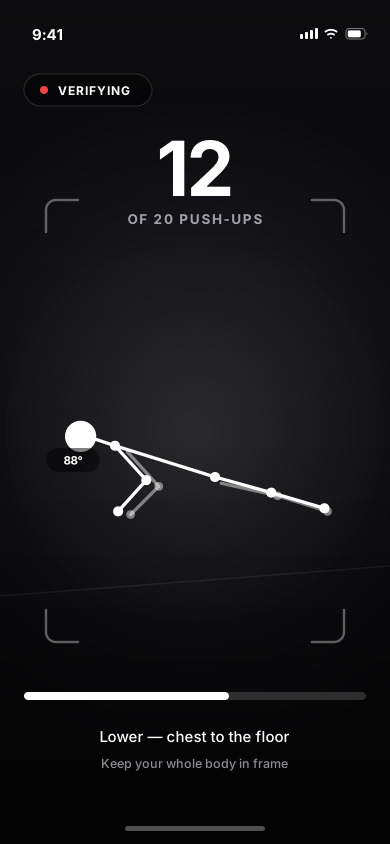
Complete the challenge
Reach for a locked app and you get a challenge instead. Your camera counts the reps.
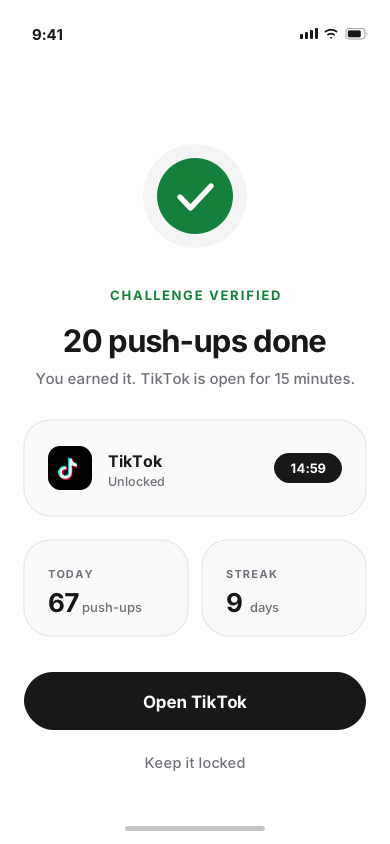
Unlock and move on
Challenge verified, app open. You were never forbidden from it — you just had to earn it.
Blocking isn’t enough.
Traditional app blockers tell you no — so you turn them off. Lockout asks you to earn it, which is a much harder argument to win with yourself.
Camera verified
Pose detection watches the movement itself, so the reps have to happen. No tapping your way past it.
A real price tag
Every locked app carries a cost you set. Opening it is always possible, never automatic.
Your rules
Choose what each app costs you: push-ups, squats, jumping jacks, or a 1 km walk.
Time you chose
An unlock buys a set window. When it runs out, the lock comes back on.
No cheating.
Lockout is built to use your iPhone camera and pose detection to watch the movement itself. It counts what you actually do, so there is nothing to tap past and no timer to wait out.
- Pose detection follows the rep, not the clock
- The challenge stays up until the movement is recognised
- Live rep count and form hints while you go
Make distraction cost something.
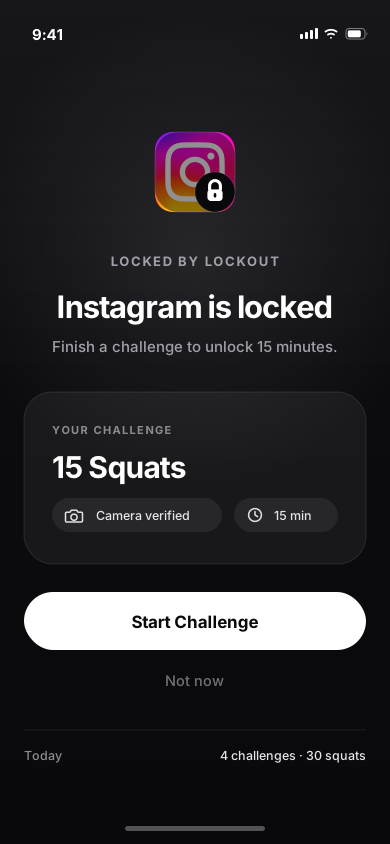
Opening Instagram isn't forbidden. It just isn't free any more. Every locked app carries a price you set, and you pay it before the app opens.
- Set a different challenge for every app
- An unlock buys a window, not the whole evening
- When the window closes, the lock comes back
Make the rules yours.
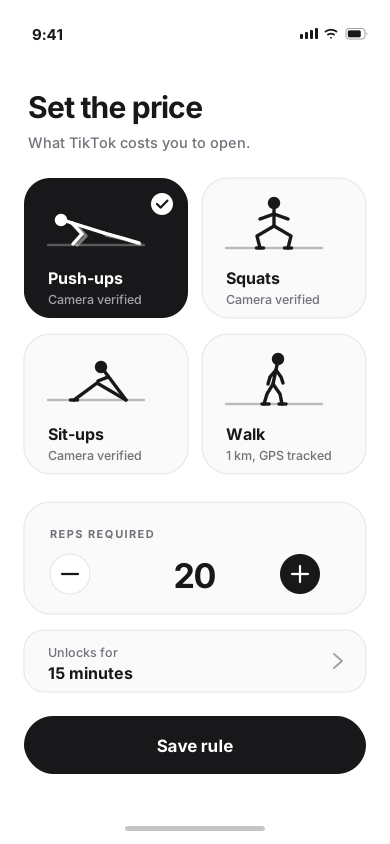
You know what you'll actually do at 8am, and what you'll talk yourself out of. Pick what each app costs you, then raise the price when it stops working.
Push-ups
Camera verified
Squats
Camera verified
Jumping jacks
Camera verified
Walk
1 km, GPS tracked
The whole idea
Your attention is valuable.
Stop giving it away for free.
Locked, earned, unlocked.
The whole loop, from the wall you hit to the minutes you walk away with.
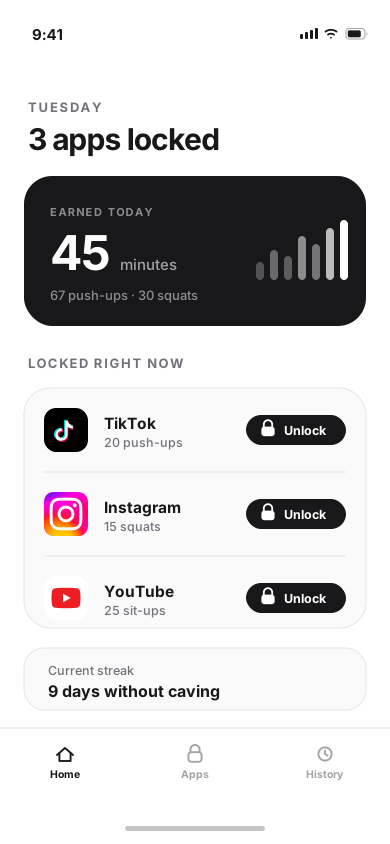
Home
What you have earned today, and what is still locked.
Locked
The wall you hit when you reach for the app on autopilot.
Challenges
Pick the challenge and the price, app by app.
Verification
Pose detection counts the reps as you do them.
Unlocked
Verified. The app opens for the window you set.
Use your phone on purpose.
Lockout isn’t about deleting social media. It’s about the difference between opening an app because you decided to and opening it because your thumb already knew where the icon was.
Keep the apps. Lose the autopilot.
FAQ
Lockout is an iPhone app that puts your most distracting apps behind a challenge. Instead of blocking them outright, it asks you to complete something real — like a set of push-ups — before it lets you in.
Lockout is built to use your iPhone camera together with pose detection, so it responds to the movement itself rather than to a tap or a timer. The challenge stays up until the reps are recognised.
Yes. Lockout is designed around you deciding which apps are worth guarding. Anything you do not add is left completely alone.
No. Push-ups are the clearest example, but Lockout also counts squats and jumping jacks, or you can set a 1 km walk instead — and you decide what each app costs.
That is not the goal. Permanent blocks tend to get uninstalled. Lockout adds friction instead, so opening an app becomes a decision you make rather than a reflex you follow.
There is none. Lockout runs Apple's on-device body-pose detection over the live camera frames, measures the joint positions it needs to count a rep, and releases each frame immediately. No video is recorded, no still image is saved, nothing is written to disk, and no image data reaches us or any third party. The only thing that outlives a challenge is the count. The privacy policy sets this out in full.
Lockout is still in development and is not on the App Store yet. There is no download link on this site until there is a real one to give you.
Make your screen time
earn its place.
Lockout turns your biggest distractions into something you actually have to work for.

In development for iPhone. No download link until there’s a real one.